InTrack
Jobsite inventory, material checkout, and job-cost tracking that lives on your crew’s phones. Scan materials out to a job in seconds, watch each job’s budget update in real time, and let the reorder list build itself — so nothing walks off the truck uncounted.
Not sure it's worth it? Run the 60-second shrinkage estimator
Materials leave the warehouse. Your job cost leaves with them.
Crews grab paint, fittings, and fasteners off the shelf and out to the truck, and nobody writes it down. By the time the job closes, the budget is a guess, the stockroom is short, and the reorder that should have happened last week didn’t.
Whiteboards and spreadsheets don’t survive contact with a jobsite. InTrack puts a fast, scan-and-go checkout in every crew member’s pocket, so every dollar of material lands on the right job the moment it’s picked up — and the office sees it instantly.
The warehouse-to-jobsite loop, closed.
Built for contractors and field crews who need to know what they have, where it went, and what the job actually cost — without stopping to do paperwork.
-
01 /
Scan materials out to a job.
Crew opens the app, scans a barcode, picks the job, done — materials are checked out in seconds. A Return mode shares the same flow to put unused stock back and credit the job.
-
02 /
Live inventory with reorder points.
SKUs, categories, units, cost, and on-hand counts stay current with every checkout. Set a reorder point per item and InTrack flags low stock before it becomes a problem.
-
03 /
Job budgets that update themselves.
Every checkout books material cost to the job automatically. The dashboard shows spend by job, active jobs, a running spend chart, and cost-by-category — no month-end reconciliation.
-
04 /
Purchasing that writes its own list.
Items at or below their reorder point roll into a purchasing report with distributor, cost, and suggested quantity — so restocking is a review, not a hunt through the shelves.
-
05 /
Morning Pick List from a simple email.
Crews email what they need in plain English. InTrack reads the message, matches it to your catalog, and drops a ready-to-fulfill order into a Pick List the office reviews with one tap.
-
06 /
The right view for every role.
Crew gets a stripped-down, dollar-free checkout screen. Project managers and admins get budgets, analytics, cycle counts, purchasing, and team management. Everyone sees only what they should.
This is what Monday morning looks like.
Real screens from a live account. The office sees stock value, spend by job, and what’s running low — while the crew sees one screen and a scan button.

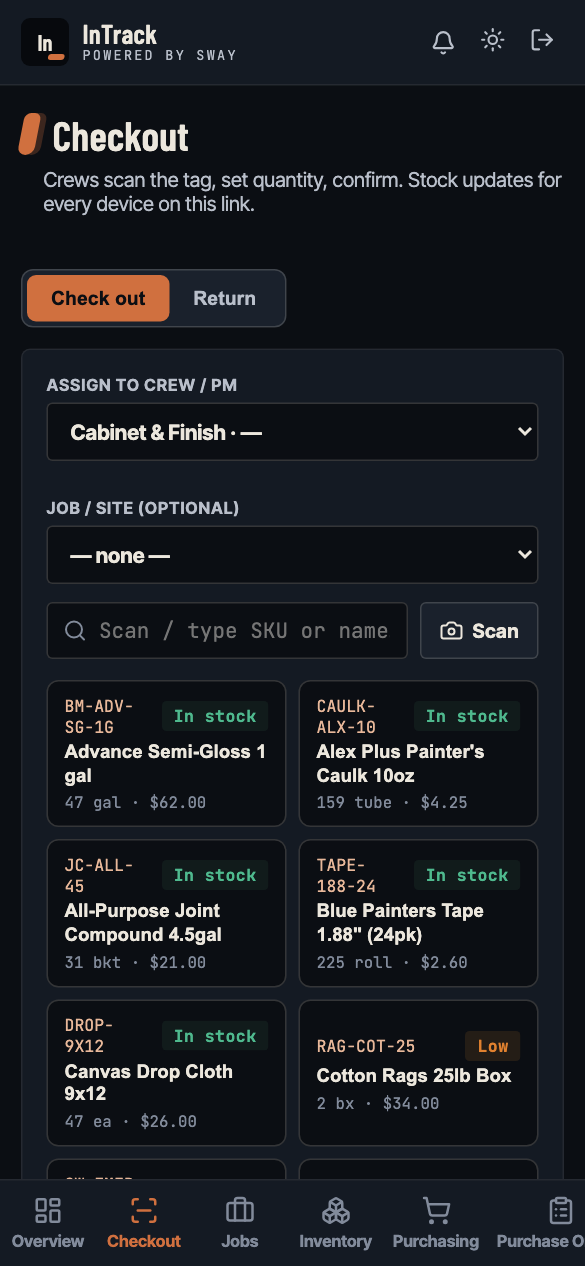
Overview & Checkout. Every checkout books material cost to a job the moment it leaves the shelf.
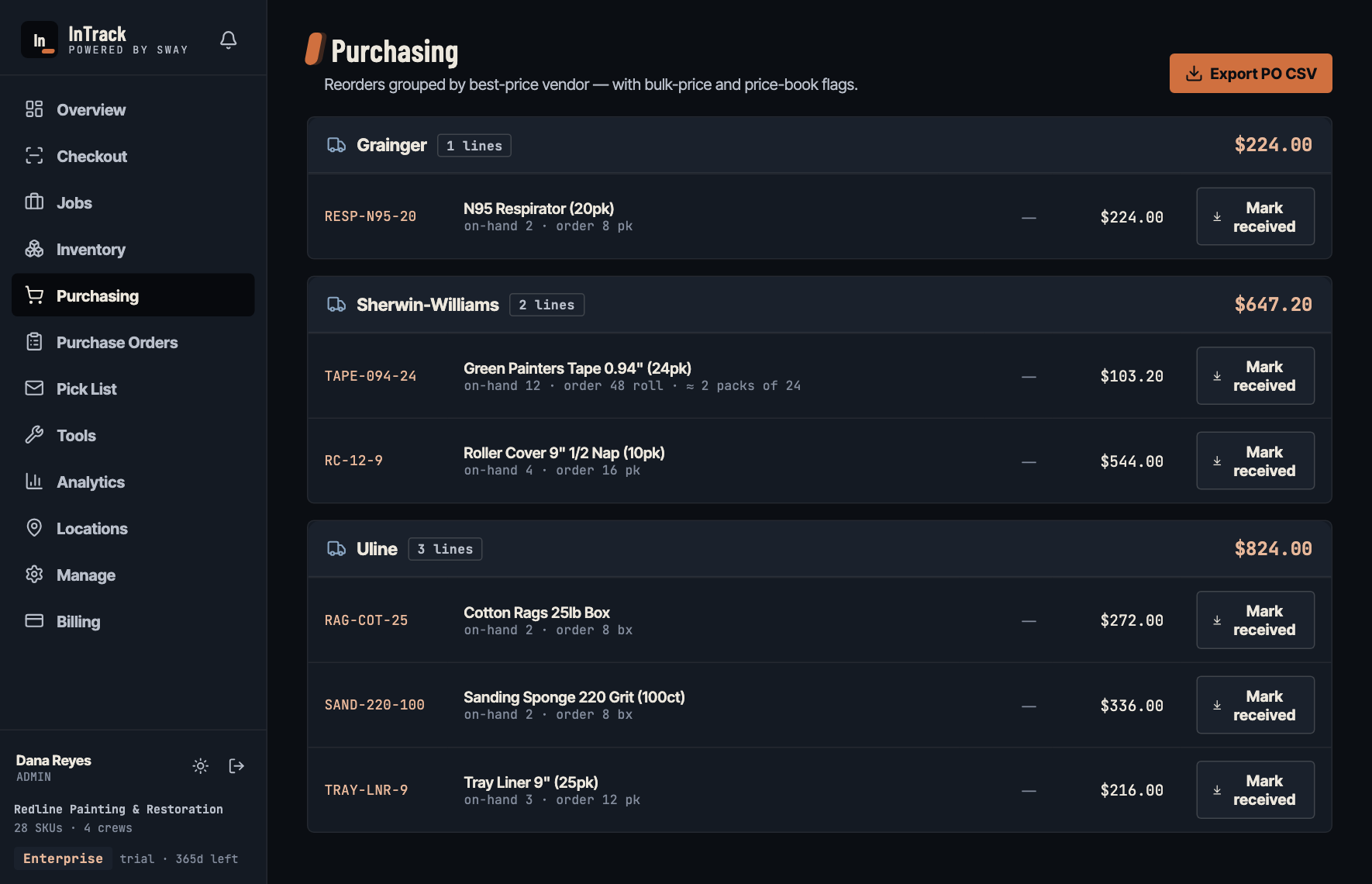
Purchasing. Writes its own list, grouped by supplier.
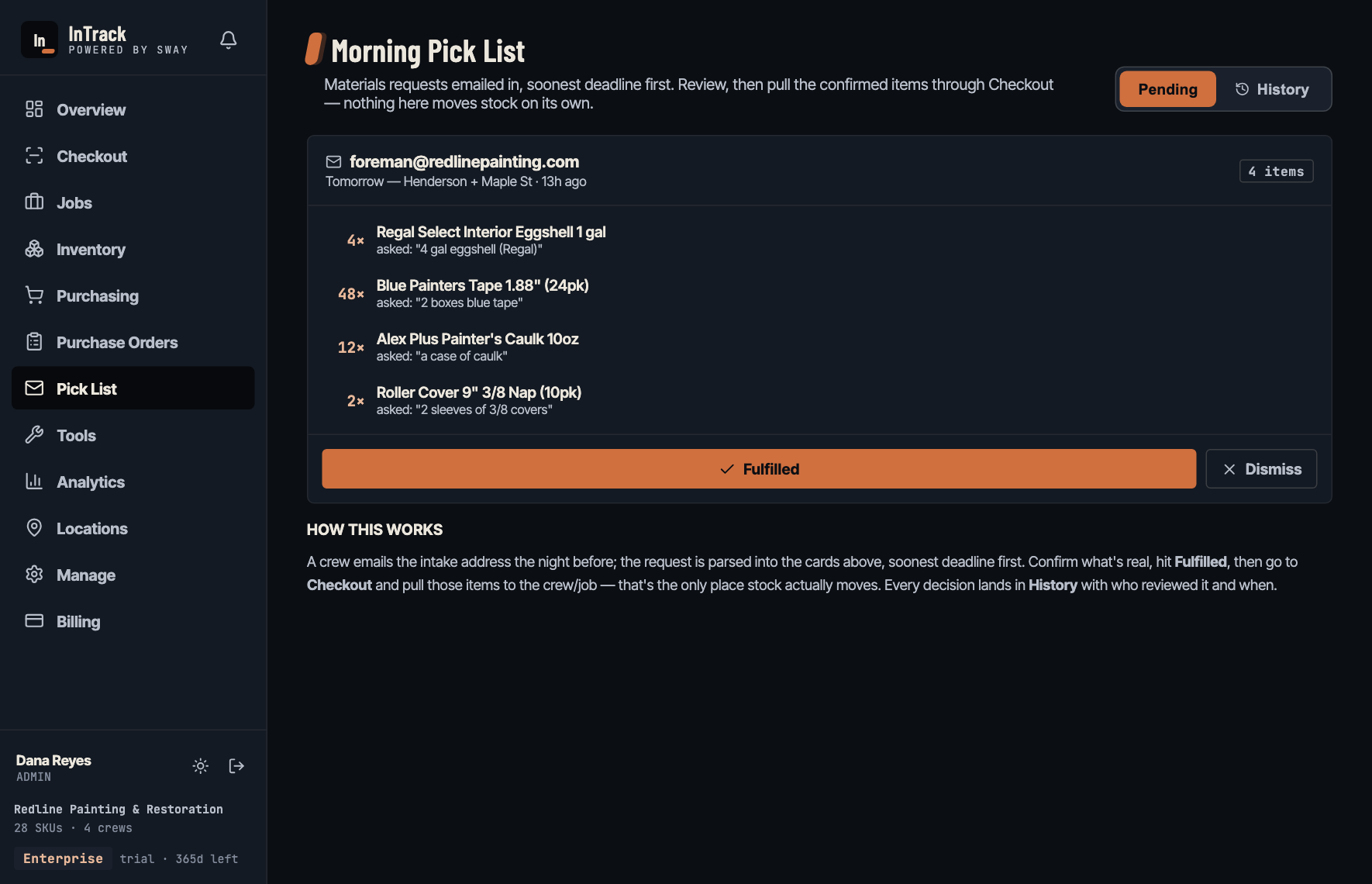
Pick List. “2 boxes blue tape” → matched to your catalog.
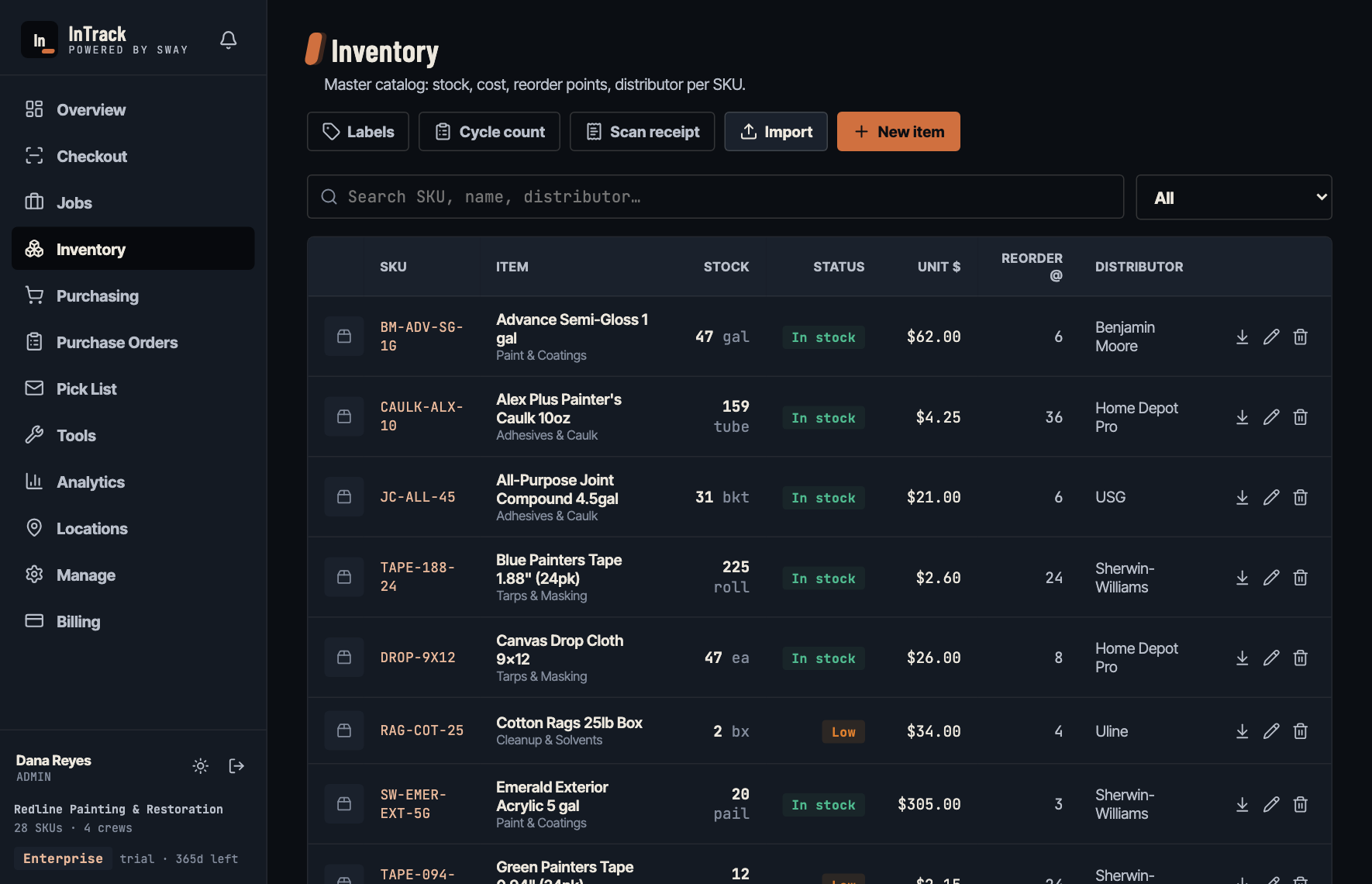
Inventory. Stock, cost, and reorder points per SKU.
Flat monthly tiers. Not per seat.
Every trial starts with the full Pro featureset for 14 days — no card required — and includes a 30-minute setup call with Rob. Your whole crew scans on every tier; nobody gets left off the system to save a seat fee.
- Unlimited users
- 1 location
- Checkout, restock, scan & real-time
- CSV & Excel import
- Everything in Starter
- Unlimited users
- Purchase orders + receiving
- Reorder alerts (email + in-app)
- Crew usage reports
- Everything in Pro
- Unlimited locations
- Multi-location + transfers
- Unlimited users
Cancel any time · your data exports whenever you want it
What you need to know.
Runs on any phone or laptop
An installable web app — add it to a home screen and it behaves like a native app, no app store, no install headaches. Changes sync in real time across every device on the account.
Crew, PM & admin access
Role-based screens keep costs and settings out of crew hands, with two-factor sign-in, per-company data isolation, and an append-only audit log of who moved what.
Import your catalog in minutes
Bring your item list in by CSV — QuickBooks and Excel exports map automatically. Cycle counts keep on-hand honest, and built-in barcode labels tag anything that doesn’t already scan.
Your data stays yours
InTrack runs at intrack.swayintegrations.com on a private, per-company workspace. Your catalog, jobs, and history stay in your account — export any time.
Common questions.
What is InTrack?
InTrack is a jobsite inventory, material checkout, and job-cost tracking app for contractors and field crews. Crews scan materials out to a job from their phone, and every dollar of material lands on the right job automatically.
Do I need to install anything from an app store?
No. InTrack is an installable web app (PWA) — open it in any browser and add it to your home screen for an app-like icon. It runs on iPhone, Android, and desktop, and updates instantly for everyone.
Can my crew see job costs and budgets?
Only if you want them to. Crew members get a stripped-down, dollar-free checkout screen, while project managers and admins see budgets, analytics, and reports. Roles are enforced all the way down to the data.
How do I get my existing inventory into InTrack?
Import your item list by CSV — QuickBooks and Excel exports map automatically, and sample and blank templates are provided. Cycle counts keep your on-hand counts honest over time.
Does it track job budgets automatically?
Yes. Every checkout books material cost to its job in real time, so the dashboard shows spend by job, active jobs, and cost by category with no month-end reconciliation.
What happens when stock runs low?
Set a reorder point per item and InTrack flags low stock, then rolls those items into a purchasing list with distributor, cost, and suggested quantity — so restocking is a quick review instead of a shelf hunt.
Do I have to set it up myself?
No. Every trial includes a 30-minute setup call with Rob, the founder. On the call we import your catalog from your QuickBooks or Excel export, print barcode labels for anything that doesn't already scan, and run your first real checkout together on a crew phone. Most shops leave the call with the system live. If you'd rather do it yourself, the CSV import and label printing are built in and take about the same half hour.
How much does InTrack cost?
Every tier has unlimited users. Starter is $99/month (one location), Pro is $249/month (one location), and Enterprise is $499/month (unlimited locations with transfers). Tiers are flat monthly — not per seat, and we will never move you to per-seat pricing — and every 14-day trial includes the full Pro featureset plus a 30-minute setup call, no card required.
Put InTrack on your crew’s phones.
Start your 14-day free trial — no card required. Every trial includes a 30-minute setup call with Rob: we import your catalog (CSV or Excel), print your labels, and run your first real checkout together, so your crew’s checking materials out to jobs the same day. Prefer a walkthrough first? Book a demo.
Plans from $99/month flat — not per seat, ever · Add your whole crew · Setup call included · Cancel any time